How the Redesigned Publisher Tools Work: A Technical Guide
Written by Darian AvasanIf you haven’t heard of our Web Monetization Publisher Tools yet, you’re missing out on a simple way to monetize your content! Don’t worry, you can catch up on the details here. Today, we’ll focus on the redesign.
The Publisher Tools have been completely redesigned with a focus on simplicity, but there’s a lot happening behind that simplicity. Let’s find out how things work after the embed script tag gets added to a website.
From Script Tag to Rendered Component: The Complete Flow
The new system cleanly separates responsibilities. Publishers create a tools profile and use the interface to customize how their tools look. The interface is referred to as the frontend module. Visitors then consume the configuration at website runtime by experiencing the custom tools on the web monetized site they are viewing. The frontend and visitor-facing flow never interact directly, they’re connected only through stored configuration.
The Publisher Embeds the Script
<script id="wmt-widget-init-script" type="module" data-wallet-address="https://ilp.wallet.money/alice" data-tag="version1" src="https://cdn.webmonetization.org/widget.js"></script>Why we need a cdn module
Publishers embed this script on their sites, so it must load quickly. The cdn module bundles the component source code, optimizes it for production, and serves it from Cloudflare’s global network.
Each interactive tools is a Lit web component class that can then be imported by the cdn script.
The CDN’s role is pure delivery: take the source code from components module, bundle it and serve it.
Configuration Fetch from API
The embedded script makes an HTTP request to fetch the interactive tool’s configuration.
It includes the wallet address and preset tag retrieved as data-* attributes via the dataset property from the script element, hence the params.
The API looks up the stored configuration for the wallet-address and returns the right profile settings as JSON.
Why we need an api module
Our tool configuration preferences need to be stored on the server as JSON and served dynamically. This enables publishers to update their widget appearance without touching their website code or doing redeployment.
The api provides a service that retrieves configuration and later can handle payment operations too, so it serves two critical purposes:
- Configuration delivery: Fetch stored settings and serve them to embedded widgets
- Payment proxy: Handle the Open Payments flow (quote generation, grant authorization, payment finalization)
Based on what we’ve established so far, we can draw the following:
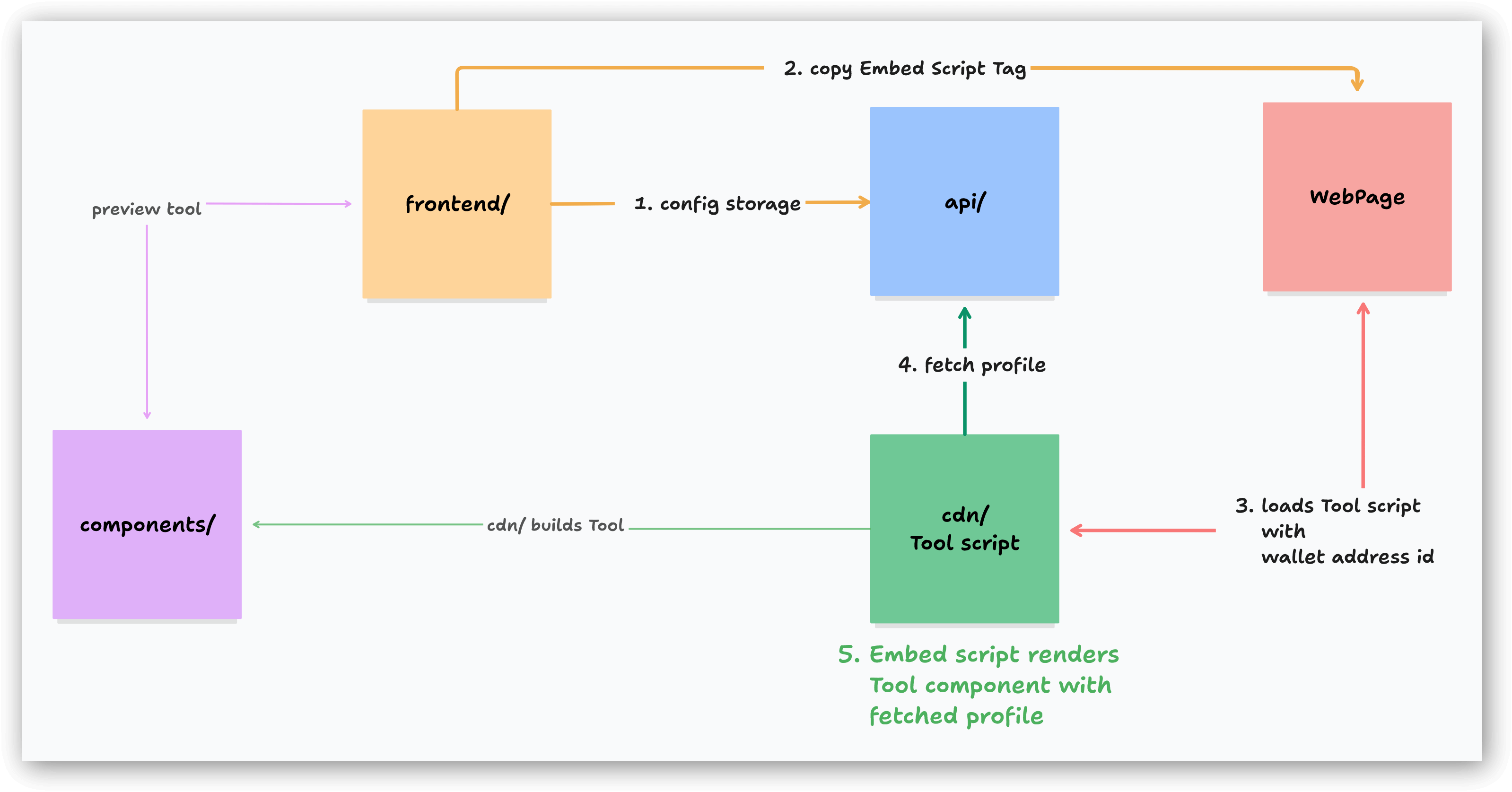
Key flow steps:
- Publisher customizes through the interface (the
frontendmodule) → Configuration stored as JSON (keyed by wallet address + preset tag e.g., ($ilp.link/your-wallet)”, “version1”). - Publisher pastes the generated embed script into the page
<body /> - Visitor loads page with embed script → Script loads from
cdnmodule - Script fetches configuration →
apiretrieves stored JSON and returns it - Script renders the Tool → Instantiates Web Component from
componentswith fetched configuration
Tool Rendering
All our Interactive Tools are built as custom Web component elements within Shadow DOM to prevent host page CSS from affecting the Tool and vice versa.
With the configuration fetched, the script creates and renders the web component:
import { PaymentWidget } from '@tools/components'customElements.define('wm-payment-widget', PaymentWidget)
fetchConfig(API_URL, 'widget', params).then((config) => {  const element = document.createElement('wm-payment-widget')  element.config = {    receiverAddress: walletAddress,    ...config  }  document.body.appendChild(element)})
The <wm-payment-widget> element is one of our interactive tools defined in the components module. The script creates an instance, passes the configuration as properties, and appends it to the DOM, using Shadow DOM for style encapsulation.
Lastly, it also adds a monetization <link> tag to the <head>, using the wallet address used through the frontend interface. That means your site becomes Web Monetized automatically. You are welcome!
function appendMonetizationLink(walletAddressUrl: string) { const monetizationElement = document.createElement('link') monetizationElement.rel = 'monetization' monetizationElement.href = walletAddressUrl document.head.appendChild(monetizationElement)}That’s it!
That’s all the embedded script does, nothing hidden or extra complexity, but don’t just take my word for it: you can always check the source code yourself. We’re open source, after all!
Why we need a components module
The UI logic for widgets needs to live somewhere separate from the embed script, hence the components module contains the actual Web Component implementations: the rendering logic, event handlers, state management, and UI interactions.
By keeping components as standalone source code, they can be consumed in multiple ways:
- Bundled by the
cdnmodule for production embed scripts - Imported by the
frontendmodule for live preview during configuration - 🎉 Potentially published as an npm package for developers who want to bundle them with their own build systems
Runtime Payment Operations
Beyond the new architecture, the Publisher Tools also handle payments using Open Payments. Every step of the payment flow is proxied through our api module. For example, when a visitor interacts with the widget wanting to make a one time donation (entering an amount, clicking “Pay”), the component makes API requests:
// Generate a quoteawait fetch(`${apiUrl}/payment/quote`, {  method: 'POST',  body: JSON.stringify({    senderWalletAddress,    receiverWalletAddress,    amount  })})
// Initialize grant authorizationawait fetch(`${apiUrl}/payment/grant`, { method: 'POST', body: '...' })
// Finalize payment after authorizationawait fetch(`${apiUrl}/payment/finalize`, { method: 'POST', body: '...' })
The API manages all interactions with the Open Payments SDK handling grant authorization, creating outgoing payments, and coordinating with the component to complete the full flow for the payment.
Key flow steps:
- Visitor interacts with widget (from
components) → Enters wallet address and desired amount - Component requests quote →
apiproxies to Open Payments infrastructure to handle the amount - Component initializes interactive grant →
apireturns authorization URL - Visitor authenticates and authorizes in popup → Wallet provider redirects back with interaction reference
- Component finalizes payment →
apicreates outgoing payment on Interledger network
What’s Next?
The redesigned Publisher Tools establish a foundation for future enhancements:
More tools We plan to add new interactive tools with new ways for visitors to interact and sponsor your website’s content through Open Payments.
Analytics integration We want to give publishers insight into how visitors engage with their tools: how often users interact and how revenue breaks down per page.
Webhook notifications Give callback webhooks to publisher when payments occur, with the amount and currency received.
Try It Yourself
The redesigned Publisher Tools are live at webmonetization.org/tools.
Check out the open source at GitHub repository.
Questions or feedback about the technical implementation? Open an issue or discussion on GitHub or connect with the Interledger developer community.
As we are open source, you can easily check our work on GitHub. If the work mentioned here inspired you, we welcome your contributions. You can join our community slack or participate in the next community call, which takes place each second Wednesday of the month.
If you want to stay updated with all open opportunities and news from the Interledger Foundation, you can subscribe to our newsletter.